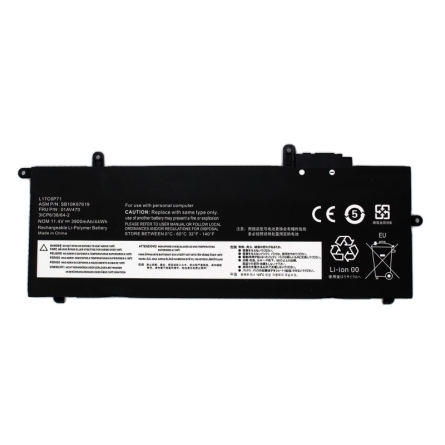
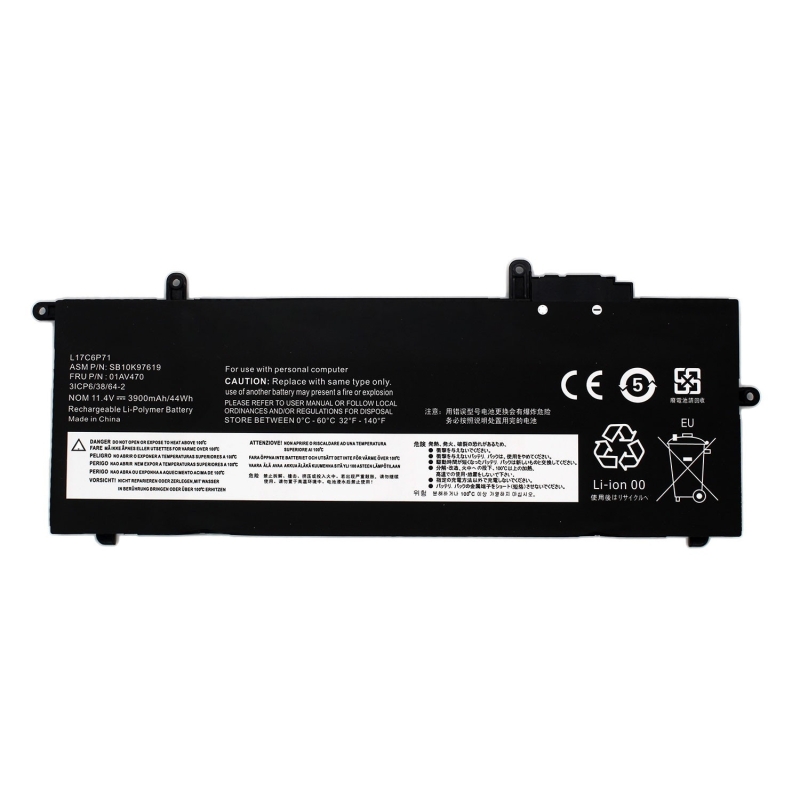
Laptop Battery LENOVO THINKPAD X280 SERIES 01AV470
Laptop Battery Lenovo
Models: ThinkPad 01AV484, 01AV485, L17C6P71, L17M6P71, L17L6P71, L17C6P72, L17M6P72, SB10K97615, SB10K97617, SB10K97628, SB10K97629, SB10K97618, SB10K97619, 5B10W13922, 3ICP6/38/64-2
High quality compatible laptop batteries
These compatible laptop batteries are designed to offer performance equivalent to that of the original battery, maintaining autonomy, stability and safety in daily use.
They are not original batteries from the laptop manufacturer, but compatible batteries developed under technical standards. demanding, allowing us to offer an excellent quality/price ratio without compromising the operation of the equipment.
Why choose a quality compatible battery
A well-designed compatible battery not only reduces cost, but can offer completely reliable performance if it meets the appropriate parameters.
These batteries are manufactured under certified quality control processes in accordance with ISO 9001 and ISO 14001 standards, which guarantees a high level of demand. both in manufacturing and in environmental management.
These batteries prioritize:
- Real compatibility with the equipment
- Stability in charging and discharging
- Integrated electronic protections
- Optimized useful life
This allows a safe and efficient user experience, comparable to the original battery under normal conditions of use.
What you should check before buying
To ensure that you choose the correct battery, it is important to verify the following data:
- Original reference of the battery
- Exact model of the laptop
- Voltage (V) and capacity (mAh or Wh)
- Shape and type of connector
In each product sheet you will find a list of compatible models and equivalent references to facilitate the identification.
FEATURES
Specifications
| Voltage: | 11.40 V |
| Capacity: | 3900 mAh |
Compatible models
- Lenovo ThinkPad A285 20MWA004AU
- Lenovo ThinkPad A285 (20MW/20MX)
- Lenovo ThinkPad A285 (20MX0002GE)
- Lenovo ThinkPad X280
- Lenovo ThinkPad X280 20KE0000ID
- Lenovo ThinkPad X280 20KE0001ID
- Lenovo ThinkPad 20KE0004SG
- Lenovo ThinkPad X280 20KE0005AU
- Lenovo ThinkPad X280 20KE0006AU
- Lenovo ThinkPad
- Lenovo ThinkPad X280 20KE0009AU
- Lenovo ThinkPad X280 20KE000AAU
- Lenovo ThinkPad 20KE000DAU
- Lenovo ThinkPad X280 20KE000EAU
- Lenovo ThinkPad X280 20KE000FAU
- Lenovo ThinkPad
- Lenovo ThinkPad X280 20KE000JAU
- Lenovo ThinkPad X280 20KE000KAU
- Lenovo ThinkPad 20KE000NAU
- Lenovo ThinkPad X280 20KE000PAU
- Lenovo ThinkPad X280 20KE000QAU
- Lenovo ThinkPad
- Lenovo ThinkPad X280 20KE000TAU
- Lenovo ThinkPad X280 20KE000UAU
- Lenovo ThinkPad 20KE000XMY
- Lenovo ThinkPad X280 20KE000YAU
- Lenovo ThinkPad X280 20KE0010MY
- Lenovo ThinkPad
- Lenovo ThinkPad X280 20KE0013AU
- Lenovo ThinkPad X280 20KE0015BR
- Lenovo ThinkPad 20KE0018SG
- Lenovo ThinkPad X280 20KE001AID
- Lenovo ThinkPad X280 20KE001BID
- Lenovo ThinkPad
- Lenovo ThinkPad X280 20KE001EAU
- Lenovo ThinkPad X280 20KE001FAU
- Lenovo ThinkPad 20KE001JAU
- Lenovo ThinkPad X280 20KE001KAD
- Lenovo ThinkPad X280 20KE001KAT
- Lenovo ThinkPad
- Lenovo ThinkPad X28020KE001KCY
- Lenovo ThinkPad X280 20KE001KED
- Lenovo ThinkPad X280 20KE001KEE
- Lenovo ThinkPad
- Lenovo ThinkPad X280 20KE001KGB
- Lenovo ThinkPad X280 20KE001KGE
- Lenovo ThinkPad 20KE001KIU
- Lenovo ThinkPad X280 20KE001KIV
- Lenovo ThinkPad X280 20KE001KIW
- Lenovo ThinkPad
- Lenovo ThinkPad X280 20KE001KMC
- Lenovo ThinkPad X280 20KE001KMD
- Lenovo ThinkPad 20KE001KMN
- Lenovo ThinkPad X280 20KE001KMS
- Lenovo ThinkPad X280 20KE001KMX
- Lenovo ThinkPad
- Lenovo ThinkPad X280 20KE001KPG
- Lenovo ThinkPad X280 20KE001KRI
- Lenovo ThinkPad 20KE001KSC
- Lenovo ThinkPad X280 20KE001KSP
- Lenovo ThinkPad X280 20KE001KTX
- Lenovo ThinkPad
- Lenovo ThinkPad X280 20KE001KZA
- Lenovo ThinkPad X280 20KE001LAD
- Lenovo ThinkPad 20KE001LCX
- Lenovo ThinkPad X280 20KE001LCY
- Lenovo ThinkPad X280 20KE001LED
- Lenovo ThinkPad ThinkPad X280 20KE001LEU
- Lenovo ThinkPad X280 20KE001LFE
- Lenovo ThinkPad 20KE001LGE
- Lenovo ThinkPad X280 20KE001LGM
- Lenovo ThinkPad X280 20KE001LHV
- Lenovo ThinkPad
- Lenovo ThinkPad X280 20KE001LIW
- Lenovo ThinkPad X280 20KE001LIX
- Lenovo ThinkPad 20KE001LMD
- Lenovo ThinkPad X280 20KE001LMH
- Lenovo ThinkPad X280 20KE001LML
- Lenovo ThinkPad
- Lenovo ThinkPad X280 20KE001LMX
- Lenovo ThinkPad X280 20KE001LMZ
- Lenovo ThinkPad 20KE001LPG
- Lenovo ThinkPad X280 20KE001LRI
- Lenovo ThinkPad X280 20KE001LRK
- Lenovo ThinkPad
- Lenovo ThinkPad X280 20KE001LSP
- Lenovo ThinkPad X280 20KE001LTX
- Lenovo ThinkPad 20KE001LXS
- Lenovo ThinkPad X280 20KE001LZA
- Lenovo ThinkPad X280 20KE001MAD
- Lenovo ThinkPad ThinkPad X280 20KE001MCX
- Lenovo ThinkPad X280 20KE001MCY
- Lenovo ThinkPad
- Lenovo ThinkPad X280 20KE001MFR
- Lenovo ThinkPad X280 20KE001MGB
- Lenovo ThinkPad 20KE001MHV
- Lenovo ThinkPad X280 20KE001MIU
- Lenovo ThinkPad X280 20KE001MIV
- Lenovo ThinkPad
- Lenovo ThinkPad X280 20KE001MMB
- Lenovo ThinkPad X280 20KE001MMC
- Lenovo ThinkPad 20KE001MML
- Lenovo ThinkPad X280 20KE001MMN
- Lenovo ThinkPad X280 20KE001MMS
- Lenovo ThinkPad
- Lenovo ThinkPad X280 20KE001MPB
- Lenovo ThinkPad X280 20KE001MPG
- Lenovo ThinkPad 20KE001MRT
- Lenovo ThinkPad X280 20KE001MSC
- Lenovo ThinkPad X280 20KE001MSP
- Lenovo ThinkPad
- Lenovo ThinkPad X280 20KE001MXS
- Lenovo ThinkPad X280 20KE001MZA
- Lenovo ThinkPad 20KE001NBM
- Lenovo ThinkPad X280 20KE001NCX
- Lenovo ThinkPad X280 20KE001NCY
- Lenovo ThinkPad
- Lenovo ThinkPad X280 20KE001NEQ
- Lenovo ThinkPad X280 20KE001NEU
- Lenovo ThinkPad X280 20KE001NFE
- Lenovo ThinkPad X280 20KE001NFR
- Lenovo ThinkPad 20KE001NGM
- Lenovo ThinkPad X280 20KE001NHV
- Lenovo ThinkPad X280 20KE001NIU
- Lenovo ThinkPad
- Lenovo ThinkPad X280 20KE001NIX
- Lenovo ThinkPad X280 20KE001NMB
- Lenovo ThinkPad 20KE001NMH
- Lenovo ThinkPad X280 20KE001NML
- Lenovo ThinkPad X280 20KE001NMN
- Lenovo ThinkPad
- Lenovo ThinkPad X280 20KE001NMZ
- Lenovo ThinkPad X280 20KE001NPB
- Lenovo ThinkPad 20KE001NRI
- Lenovo ThinkPad X280 20KE001NRK
- Lenovo ThinkPad X280 20KE001NRT
- Lenovo ThinkPad
- Lenovo ThinkPad X280 20KE001NUE
- Lenovo ThinkPad X280 20KE001NUK
- Lenovo ThinkPad X280-20KF
- Lenovo ThinkPad X280(20KF001GGE
- Lenovo ThinkPad ThinkPad X280(20KF001NMZ
- Lenovo ThinkPad X280 20KE0001LD
- Lenovo ThinkPad X280 20KE000QA
- Lenovo ThinkPad
- Lenovo ThinkPad X280 20KE001KMR
- Lenovo ThinkPad X280 20KE001KPA
- Lenovo ThinkPad 20KE001LJY
- Lenovo ThinkPad X280 20KE001LJX
- Lenovo ThinkPad X280 20KE001LMI
- Lenovo ThinkPad
- Lenovo ThinkPad X280 20KE001MGX
- Lenovo ThinkPad X280 20KE001MNX
- Lenovo ThinkPad 20KE001MTA
- Lenovo ThinkPad X280 20KE001MXA
- Lenovo ThinkPad X280 20KE001NDA
- Lenovo ThinkPad
- Lenovo ThinkPad X280 20KE001NPX
- Lenovo ThinkPad X280 20KE001NRJ
- Lenovo ThinkPad 20KE001NZU
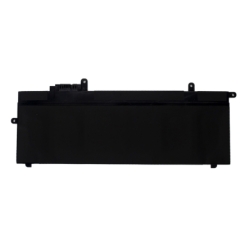
- Lenovo ThinkPad battery of your laptop with the one we show in the photographs. In some cases they may coincide in the P/N number and not physically match.
This laptop battery is compatible with the indicated models (and more). You can see the complete model of your laptop located below it. cellpadding="5" cellspacing="0">
Against deep dischargeAutomatic cut-off to protect cells. Thermal protectionTemperature monitoring and cut-off. Against short circuitsInstant safety response. Charging temperature controlStable and safe charging. RoHSRestriction of hazardous substances
Your model is not listed?
It is possible that your laptop is compatible with this battery even though it is not explicitly listed. This may occur because some manufacturers use the same battery in the list. different models or variants.
In that case, it is recommended to check the following:
- The reference of the original battery matches one of those indicated
- The voltage is exactly the same (critical data)
- The connector and shape are identical
- The dimensions are compatible with the laptop housing
If these points match, it is very likely that the battery is compatible with the equipment, even if the model is not listed.
In case of doubt, it is advisable to check compatibilitybefore making the purchase to avoid errors.
Real advantages when replacing the battery
- Recovers autonomy
Allows you to use the laptop again without constantly depending on the charger. - Stable operation
Avoids unexpected shutdowns and improves the behavior of the equipment. - Longer useful life
Reduces the need for frequent replacements. - Easy installation
In most cases, replacement is quick and does not require advanced technical knowledge.
Compatibility: the key point
Compatibility is the most important aspect when choosing a laptop battery. Therefore, in this sheet you will find all the compatible references and equivalent models associated with this product.
Choosing correctly guarantees proper operation and avoids problems during installation or use.
Recommendations for replacing the battery
Replacing the battery of a laptop is a simple process in most cases, but it is important to follow a series of recommendations to guarantee a correct and safe installation.
Before installation
- Turn off the laptop completely (not in sleep mode)
- Disconnect the charger and any peripherals
- Work on a clean, dry surface free of static electricity
During replacement
- Handle the battery with care, avoiding bumps or deformations
- Do not force connectors or parts
- Make sure that the connector fits correctly in its position
- Check that the battery is securely fixed in its housing
First use of the battery
To optimize performance and useful life, it is recommended to perform a complete initial charging cycle:
- Charge the battery to 100% before first use
- Use the laptop until the charge is reduced to approximately 10-15%
- Recharge fully
This process helps to correctly calibrate the laptop's power management system.
Tips to extend battery life
- Avoid frequent full discharges (0%)
- Do not keep the battery constantly at 100% for long periods
- Avoid prolonged exposure to high temperatures
- Always use compatible chargers that are in good condition
Important
If during installation you detect that the battery does not fit correctly or the connector does not match exactly, the installation should not be forced. In that case, it is advisable to check the compatibility before continuing.