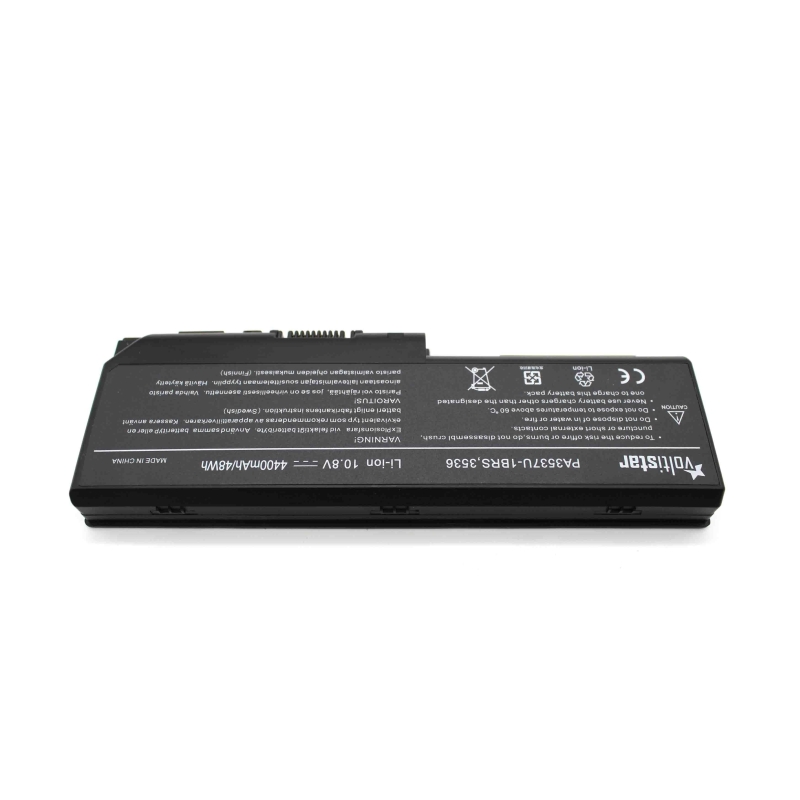
Laptop battery for TOSHIBA SATELLITE L350 L350D L355 L355D P200 P200D P205 P205D P300 P300D P305 P305D X200 L355D, P200, P200D, P205
High quality compatible laptop batteries
These compatible laptop batteries are designed to offer performance equivalent to that of the original battery, maintaining autonomy, stability and safety in daily use.
They are not original batteries from the laptop manufacturer, but compatible batteries developed under demanding technical standards, which allows us to offer an excellent quality/price ratio without compromising the operation of the equipment.
Why choose a quality compatible battery
A well-designed compatible battery not only reduces cost, but can offer completely reliable performance if it meets the appropriate parameters.
These batteries are manufactured under certified quality control processes in accordance with ISO 9001 and ISO 14001 standards, which guarantees a high level of demand in both manufacturing and environmental management.
In these batteries, priority is given to:
- Real compatibility with the equipment
- Stability in charging and discharging
- Integrated electronic protections
- Optimized useful life
This allows a safe and efficient user experience, comparable to the original battery under normal conditions of use.
What you should check before buying
To make sure Before you choose the correct battery, it is important to verify the following data:
- Original reference of the battery
- Exact model of the laptop
- Voltage (V) and capacity (mAh or Wh)
- Shape and type of connector
In each product sheet you will find a list of compatible models and equivalent references to facilitate identification.
Battery TOSHIBA SATELLITE L350
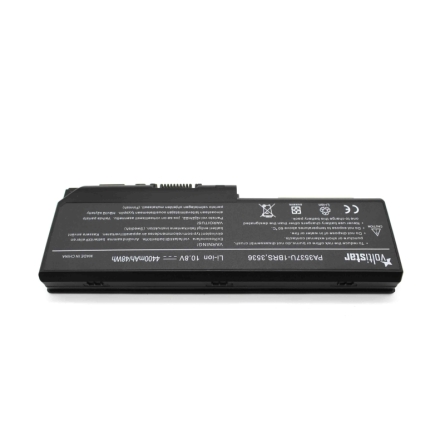
This 10.8V battery for Toshiba Satellite is the ideal option to replace yours. With 4400mAh capacity, you will have plenty of energy for your work or study day.
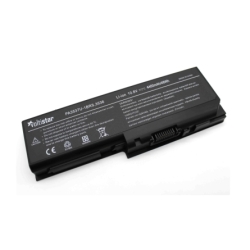
Before purchasing, compare your battery with the photos in the advertisement to make sure it is the same, as some models may have the same P/N number but be physically different. Also check the model of your laptop and that its battery voltage matches that indicated. If you have questions, do not hesitate to contact us before purchasing.
Specifications
| Voltage: | 10.8 V |
| Capacity: | 4400 mAh |
| Cells: | 6 |
Compatibility
- Toshiba Satellite L350 Series
- Toshiba Satellite L350-12N, L350-145, L350-14F, L350-153, Toshiba Satellite L350D L350-15, L350-16S, L350-16X, L350-170, L350-171, L350-172 Series
- Toshiba Satellite L350D-11K, L350D-11O, L350D-11S, L350D-123, L350D-12M
- Toshiba Satellite L355 Series
- Toshiba Satellite L355-S7811, L355-S7812, Toshiba Satellite L355D Series
- Toshiba Satellite L355D-S7809, L355D-S7810, L355D-S7813, L355D-S7815, L355D-S7819, L355D-S7820, L355D-S7825, L355D-S7829, L355D-S7832, L355D-S7901
- Toshiba Satellite P200 Series
- Toshiba Satellite P200-10A, P200-10C, P200-10G, P200-10O, P200-10T, P200-11P, P200-123, P200-12U, P200-12V, P200-12W, P200-136, P200-139, P200-13B, P200-13F, P200-13H, P200-13I, P200-13K, P200-13M, P200-13Y, P200-13Z, P200-140, P200-144, P200-14O, P200-154, P200-155, P200-156, P200-157, P200-15U, P200-16J, P200-16W, P200-16X, P200-177, P200-17B, P200-17C, P200-18C, P200-18E, P200-195, P200-1B6, P200-1BK, P200-1BY, P200-1C2, P200-1C7,P200-1CB, P200-1D0, P200-1DE, P200-1E7, P200-1E9, P200-1EA, P200-1EE, P200-1F5, P200-1FC, P200-1FT, P200-1FY, P200-1FZ, P200-1G2, P200-1G4, P200-1G7, P200-1G8, P200-143, Toshiba Satellite P200D Series P200D-107 P200D-111, P200D-11G, P200D-11J, P200D-11M, P200D-11R, P200D-1FI P205-S6267, P205-S6277, P205-S6287, P205-S6297, P205-S6298, P205-S6307, P205-S6327, P205-S6337, P205-S6347, P205-S6348, P205-S7469, P205-S7476, P205-S7482, P205-S7484
- Toshiba Satellite P205D Series
- Toshiba Satellite P205D-S7429, P205D-S7436, P205D-S7438, P205D-S7439, P205D-S7454, P205D-S7479
- Toshiba Satellite P300Series
- Toshiba Satellite P300-01Y, P300-150, P300-18M, P300-19N, P300-19P, P300-1AD, P300-1AO, P300-1BB, P300-1BN, P300-1C9, P300-1CN, P300-1CZ, P300-1EI, P300-1FC, P300-ST3014, P300-ST3712, P300-ST6711, P300-V01 Toshiba Satellite P300D Series P300D-14E, P300D-151, P300D-15O, P300D-20B, P300D-ST3711
- Toshiba Satellite P305 Series
- Toshiba Satellite P305-S8814, P305-S8820, P305-S8822, P305-S8823, P305-S8824, P305-S8825, P305-S8826, P305-S8854
- Toshiba Satellite P305D Series
- Toshiba Satellite P305D-S8816, P305D-S8818, P305D-S8819
- Toshiba Satellite X200 Series
- Toshiba Satellite X200-203, X200-20C, X200-20F, X200-214, X200-219, X200-21D, X200-21E, X200-21F, X200-21L, X205 Series
- Toshiba Satellite X205-S7483, X205-S9349, X205-S9359, X205-S9810, X205-SLi6
- Toshiba Satellite Pro L350 Series
- Toshiba Satellite Pro L350-S1001, Pro L350-S1001V, Pro L350-S1001X, Pro L350-S1701, Pro L350-16J, Pro L350-175
- Toshiba Satellite Pro Toshiba Satellite Pro P300 Series P300-14Q, Pro P300-14R, Pro P300-14S, Pro P300-16V, Pro P300-18O, Pro P300-18Q, Pro P300-19Q, Pro P300-1A5, Pro P300-1A6, Pro P300-1AY, Pro P300-1CV, Pro P300-1ES, Pro P300-1EX
- Toshiba Equium P200 Series
- Toshiba Equium P200-178, P200-1ED
- Toshiba Equium P300 Series
- Toshiba Equium P300-16T, P300-19O
- Toshiba Equium L350D Series
- Toshiba Equium L350D-11D
Cross references
- PA3536U-1BRS
- PA3537U-1BAS
- PA3537U-1BRS
- PABAS100
- PABAS101
Electronic protections
| Against deep discharge | Automatic cut-off to protect cells. |
| Thermal protection | Temperature monitoring and cut-off. |
| Against short circuits | Instant response of safety. |
| Charging temperature control | Stable and safe charging. |
| RoHS | Restriction of hazardous substances |
Your model is not listed?
It is possible that your laptop is compatible with this battery even if it is not explicitly listed? in the listing. This may occur because some manufacturers use the same battery in different models or variants.
In this case, it is recommended to check the following:
- The reference of the original battery matches one of those indicated
- The voltage is exactly the same (critical data)
- The connector and shape are identical
- The dimensions are compatible with the laptop housing
If these points coincide, it is very It is likely that the battery is compatible with the device, even if the model is not listed.
In case of doubt, it is advisable to verify compatibility before making the purchase to avoid errors.
Real advantages when replacing the battery
- Recovers autonomy
Allows you to use the laptop again without constantly depending on the charger. - Stable operation
Avoid shutdowns unexpected events and improves equipment performance. - Longer lifespan
Reduces the need for frequent replacements. - Easy installation
In most cases, replacement is quick and does not require advanced technical knowledge.
Compatibility: the key point
Compatibility is the most important aspect when choosing a laptop battery. Therefore, in this sheet you will find all the compatible references and equivalent models associated with this product.
Choosing correctly guarantees proper operation and avoids problems during installation or use.
Recommendations for replacing the battery
Replacing the battery of a laptop is a simple process in most cases, but it is important to follow a series of recommendations to guarantee a correct and safe installation.
Before installation
- Turn off the laptop completely (not in sleep mode)
- Disconnect the charger and any peripherals
- Work on a clean, dry surface free of static electricity
During replacement
- Handle the battery with care, avoiding knocks or deformations
- Do not force connectors or parts
- Make sure that the connector fits correctly in its position
- Check that the battery is well secured in its housing
First use of the battery
To optimize performance and useful life, recommends performing a full initial charge cycle:
- Charge the battery to 100% before first use
- Use the laptop until the charge is reduced to approximately 10-15%
- Recharge fully
This process helps to correctly calibrate the laptop's power management system.
Tips to prolong lifespan
- Avoid frequent complete discharges (0%)
- Do not keep the battery constantly at 100% for long periods
- Avoid prolonged exposure to high temperatures
- Always use compatible chargers in good condition
Important
If during installation you detect that the battery does not fit correctly or the connector does not match exactly, the installation should not be forced. In that case, it is advisable to check the compatibility before continuing.